PDA program for Vegetation
Data Collection.
DataPðint has been designed to facilitate
vegetation data collection for:
plot data,
point-intercept data,
species lists.
Ø
Species lists are quickly
constructed using a species lookup file.
Ø
Point-intercept hits are
incremented by tapping
+ or
-.
Ø
Cover Values for plots can
be directly entered using the keyboard.
Ø
Values can include one
decimal place, which can be used to indicate species that are present but not hit, or that
have very low cover.
Ø
Data can be collected to
differentiate overstory canopy from understory as well as identify vegetation outside of
the overstory canopy.
Ø
Long species lists can be
sorted to bring the highest values to the top and sort species with the same values
alphabetically.
Ø
Site data are recorded and
linked to the vegetation data.
Ø
Vegetation and Site data
are exported as comma delimited files that are directly imported into EXCEL. The vegetation data from many samples can be
quickly summarized with pivot tables.
Ø
Paper copies of data are
easily printed in the field and the digital files are easy to transfer and backup.
Ø
NO MORE DATA REENTRY AND QC ! ! ! !
Ø
Multiple Projects and
Species Lists can be accessed.
Ø
Last years sample
data can easily generate the species list for this years sample.
To order - contact Patrick Murphy
303-444-4358 EcotoneCo@aol.com
Current price = $250. See below for estimates of hardware and other
software costs.
NOTE:
The DataPðint
program functions on Windows CE PDAs and not the Palm OS devices.
The current version works in .NET Compact Framework v.1.0 SP3 and uses SQL CE
v2.0 on Pocket PC 2002, 2003, Windows Mobile 2003 including Second Edition,
Windows CE v4 and up, and Windows Mobile 2005.
This
program will run on all of the less expensive Windows PDAs and can be modified to
run on the newest and more expensive. The
.NET Compact Framework and SQL CE are provided free with the DataPðint
program, and greatly enhance the speed of database processing.
PDA
characteristics and estimated hardware costs:
See
below for more program screen shots
and more detailed comparison with paper and tablet PCs.
General Operation Instructions:
Screen shot examples.
Click Hyperlinked text to get detailed instructions.
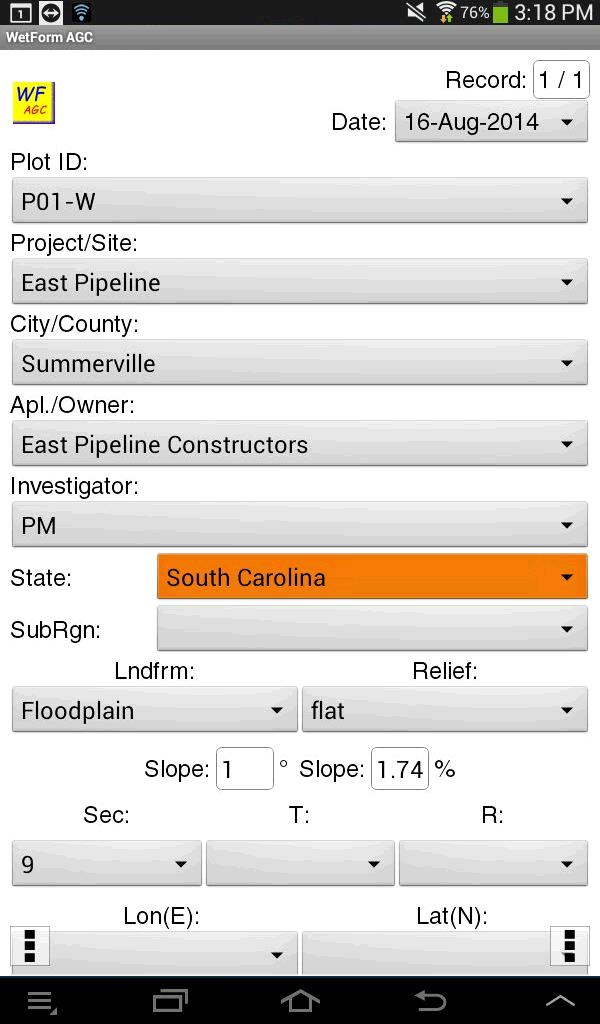
Project Screen
The project screen allows sample
and site information to be recorded. Slope data that are entered in
degrees are automatically converted to percent and entered in the Slope % field.
If you have projects that require different species lists, for example projects
in different states that use different nomenclature, you can have multiple
species lists loaded to select for a particular project. However, only one
species list may be used for each project.
If you have a long-term
monitoring project where you need to return to a site multiple times, you can
export the data from one year, open the data in an Excel spreadsheet, easily
convert all of the cover values to zero, change the project name (i.e.
ProjectX2005 to ProjectX2006), delete the date, and have a ready-made template for the next year
that will include project information as well as species lists.

Main Vegetation Data Entry Screen
Note that data can be either
entered in single increments, as is needed with point-intercept samples, by
taping the + sign. The keyboard can just as easily be used to enter larger
values for other sample plot types. The I-hit column is first-hit data
(also known as [a.k.a.] top canopy) the II column is second-hit cover (a.k.a. cover that is under the
top canopy). This allows a total of canopy cover for each individual
species to be calculated as well as the top canopy cover.
The Up column allows the
collection of tree and tall shrub canopy data, and the DWU (Down With
Up) column
is used to record data that occurs under the tree and tall shrub canopy.
This allows distinction of the vegetation data that occurs under tree and
tall shrub canopy and data that occur outside of the tree and tall shrub
canopy. This can be extremely significant especially in woodland
communities.
The species list is easily
created using a lookup file that can be exported, edited and re-imported.
The species list on the PDA screen can be sorted either alphabetically, or with
highest cover species first, or by growth form.
Instead of manually recreating the
species list for each sample, the "Save and Start New Sample" option will
quickly recreate the existing species list for the next sample and change all of
the cover values to zero.

Species Add Screen
The species list is quickly and
easily created using a lookup file that can be exported, edited and re-imported.

New
Species Screen
New species can also be added to
the master list.

Estimate of hardware and software costs.
----------------------------------------------------------------
PDA
- Characteristics
Small - 6-8 oz
+/-Cheap
- $200 to $600
Easy
to weatherproof $50-100 Otterbox/ or light/heavy duty ziplock bags
Standard
programs are usually much cheaper $20 to $50
Long
battery life (5-12 hours), small/cheap batteries.
TFT
transflective screens for daylight (works well but still a little trickygetting
the sunlight angle right)
Printing
the Data
A separate program called SprintDB can import the comma delimited file .csv and print it
out to smaller mobile printers via Infrared (Ir), Bluetooth, or wireless 802.11 LAN. A small Ir printer (Sipix A6) is no longer made but
is abundantly available via eBay for about $25 to $30.
I have used these a lot and they are slow but work well. Other small wireless printers are much more
expensive about $60 to $800. DataPoint
comes with a SprintDB form that is designed to make the print process quick and easy, but
the SprintDB program must be purchased separately.
SprintDB
Pro + Printing - $43 This is the ACCESS database program
for the PDA that also allows
printing through the infrared, Bluetooth or serial ports.
Forms for other purposes can be quickly created to run on the PDA and
exported as ACCESS database files to be used on the desktop computer.
-----------------------------------------------------------------------------------------
Rough
estimate of basic Software and Hardware costs:
$250
PDA
$50
Printer
$43
SprintDB
$250
DataPðint
Software
$593
Total -
About the cost of a cheap desktop computer, but the desktop wont fit in your
pocket.
See
the following information for more details, including adding GPS and GIS to the PDA.
The handheld computer is most often referred to as a PDA - Personal digital
Assistant.
-----------------------------------------------------------------------------------------------------
PDA
Personal Digital Assistant
Comparison
with Tablet/Notebooks or Paper
Pro
PDA vs. Tablet-
Smaller - 6-8 oz vs. 4-7 pounds
Cheaper
- $200 to $600 vs. $1,000 to $3,000
Easier
to weatherproof $50-100 Otterbox/PocketSolutions or light/heavy duty ziplock bags
Standard
programs are usually much cheaper $20 to $50 vs. $100 to thousands
Longer
battery life, smaller/cheaper batteries.
Both
have TFT transflective screens for daylight (but still a little tricky)
Pro
Tablet vs. PDA
Larger
map images
Faster
processors
Standard
Windows Operating Procedures
Pro
Tablet/PDA vs. Paper
Original
Data Entry can be streamlined with error checking
- Species nomenclature can be standardized using a lookup list
- Total hits are continuously tallied
Computer
data entry eliminated and Data QC can be greatly reduced or eliminated
Handwriting
legibility not an issue
Easier
to operate in rain/wind
Data
can (must) be backed up easily in the field with wireless/wired connection to notebook or
a mobile phone or a mobile printer.
Pro
Paper
No
batteries
Cheaper
initially
Fewer
complexities
Well
established
If
there is an equipment breakdown there is always the fall-back to paper
----------------------------------------------------------------------------------------------
PDA
in General
Windows CE and Palm OS Two competing brands
of hardware and software
There
is a confluence of Operating Systems, and Windows CE seems to be wining. Palm is making PDAs with Windows CE Operating
system
Windows
CE
PC 2002
PC 2003
Windows Mobile 5 Most new PDA's have this, but
only a few pieces of older hardware have this, and not all
PDAs will upgrade.
Memory
info for the older/cheaper PDA's.
The newer ones sometimes
have only non-volatile memory.
Memory
usually 64 to 128 Megabytes built-in, split between two different types
volatile and non-volatile
Volatile
memory you can lose this if the battery goes completely dead
- Some of the installed
programs and their data are here.
- there
is a reserve of about 3 days after the screen goes blank
- you
can change batteries without losing data
Non-volatile
memory not lost even when battery is completely dead
- Operating
system is safe
- IPAQ
backup RAM is safe
- External
Memory (up to 2 Gigabytes) cards are safe the bulk of most programs can be
installed here.
Non-volatile
memory is where you need to store data.

Backup
of volatile or non-volatile memory is easy and can be stored on Memory card or on Desktop
Computer
-------------------------------------------------------------------------------
PDA external connections
Hardwire
or wireless connection with ActiveSync necessary to easily load programs and synchronize
data:
Outlook Calendar
Contacts lists
Tasks
Databases
Can use Windows Explorer on the Desktop to transfer/translate files
Wireless
LAN local area network up to 300 ft typically used for internet access and
file transfer
Bluetooth
up to 30 ft typically used for device connection (GPS, printers, headsets)
and file transfer
IR
(infrared) about 12 inches used for older device connections (printers) and simple
transfers
Not
all PDAs have all wireless options.
Built
in programs in Pocket PC
Excel
but not all functionality
Word
but not all functionality
Outlook
different and not all functionality
Pocket
explorer like Windows Explorer but wont show file extensions
ACCESS
is NOT built-in but there are a lot of good cheap programs that let you do the same
kind of form creation etc. The .cdb
file format is used by all of these programs and it is automatically converted to an
ACCESS database .mdb when files are transferred to the desktop. Forms have to be created separately for the PDA and
for the desktop.
----------------------------------------------------------------------------
PDA
file types
Not
all file types are exactly the same on the PDA and Desktop but Activesync will
automatically translate them.
Excel
.xls = .pxl
Word
.doc = .psw
Access
.mdb = .cdb
Other
file types are the same.
Adobe
.pdf (can get free viewer that can wrap pages
to small screen)
.jpg
.txt
---------------------------------------------------------------------
Adding
new programs
Most
programs are cheap, about $20 to $50
I
have:
Advanced
Explorer $10 - a better program than the built in Pocket Explorer. This one shows file extensions.
Another program called Total Commander is free.
SPB
Pocket Plus - $15 much better organized start screens
Pocket
Informant - $25 much better than the built in Pocket Outlook, Contacts and Tasks
SprintDB
Pro + Printing - $43 This is the ACCESS database program that also allows
printing through the infrared, Bluetooth or serial ports. Customized
data forms can be created on the PDA.
SprintDB
for the Desktop - $40 This allows databases and forms to be created on the
desktop and then transferred to the PDA. Databases
and forms are transferred separately rather than in one file like ACCESS.
PocketDOS
- $40 This allows me to run ETONE on the PDA.
This DOS program will import the .csv files and process the data into
detailed tables.
ArcPAD
- $517 This allows me to use aerial photos, topos, linework and points combined
with a GPS. The data go in and out as shape
files that can be easily imported/exported from AutoCAD or ESRI products.
Total
= $650 ($133 minus ArcPAD) for the PDA, and $40
additional for the SprintDB desktop.
Extra
hardware
A
Bluetooth wireless GPS can be about $75 to $150.
1GB-2GB
of SD (Secure Digital) RAM about $25-$60
So
$250 PDA + $133 misc. software + $100 GPS unit + $25
1GB Ram + $30 cheap map program that
will link to GPS and Line/points + $25 printer = $563.
The total with ArcPad = $1,080. Note:
Most of the software can be loaded on any PDA if the name of the owner is the same.
NOTE:
PDAs are more primitive than desktops and can still occasionally lock up.
The
processor runs at about 300 to 600 while desktops today run at about 1,500 to 3,000. The first desktop computer I had ran at 20, and
cost about $1,200.
-----------------------------------------------------------------------------------------------------
Data
Collection Process with DataPðint
- Collect data with DataPðint Software and create a
comma-delimited output file.
- Back up data to non-volatile ram and
print using SprintDB and the comma-delimited file, or send file to another device
through either cable or a wireless connection.
- Import the comma-delimited data to
EXCEL or other database program such as ACCESS. (optionally contact Ecotone for ETONE data processing
program).
- Process data and create tables.
-----------------------------------------------------------------------------------------------------
Printing
the Data
A
separate program called SprintDB can import the comma delimited file .csv and print it out
to a small Infrared (Ir) printer (Sipix A6). This
printer is no longer made, but easily available via eBay for about $25 to $30. Other small printers are much more expensive
about $60 to $800.
And remember that the PDA can do so many other tasks besides just
synchronizing calendars, and contact lists. Such
as:
Ø
sample adequacy calculations,
Ø
GPS navigation,
Ø
Custom data forms,
Ø
Read Adobe .pdf files,
Ø
Record audio notes,
Ø
and yes
the newer ones can phone home.
I have also created
complete COE Routine Wetland delineation
forms that run on the PDA and the Desktop. These
also use species lookup files with automatic lookup of wetland indicator status. Lots of the other items are filled in with drop
down boxes, such as soils characteristics. Ask
about this if interested.