![[Company Logo Image]](images/ecotone2.gif)
|
DataPoint Android DataPoint Purchase through Google Play. WetForm Android
PDA no longer supported. See the Android version on Google Play WetForm Access Selecting the Buy Now option will take you to a secure site that handles sales through PayPal but allows payment through all credit cards as well.
|
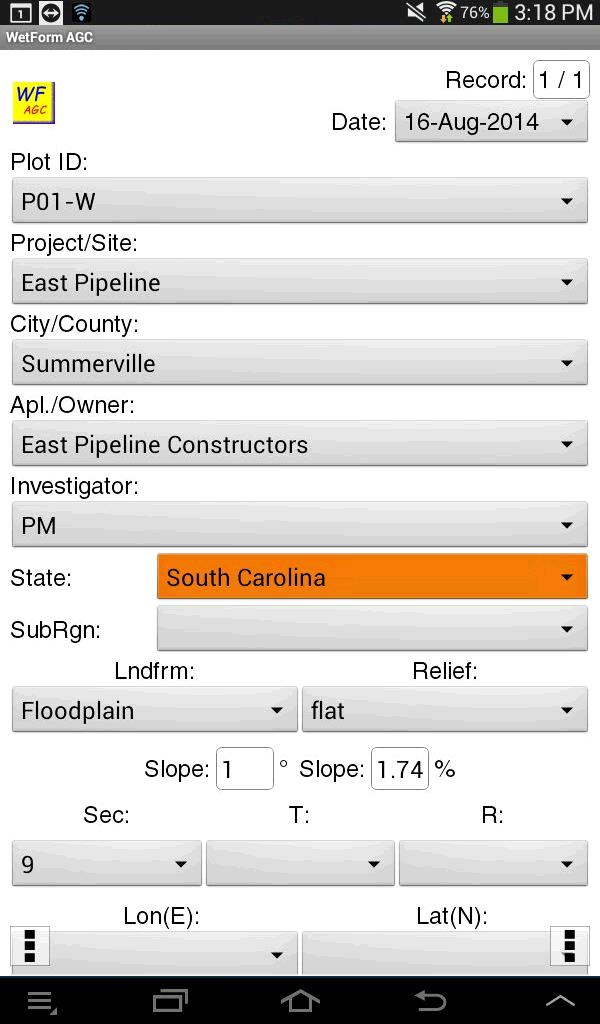
1,280 licenses sold by August 7, 2020 and currently installed on over 340 Android devices. WetForm and DataPoint are software programs that make data collection fast and efficient. WetForm is an automated electronic form for the collection and reporting of COE wetland delineation data. DataPoint is specialized for the collection of all types of vegetation data including point-intercept, plot, line-intercept, density, inventory lists. WetForm - Wetland Delineation Data Forms (for all COE Regions)
>>> Click Here for a YouTube Video of the Desktop and Android Wetform Features<<<
>>>>Click here for link to 16M Google Earth KMZ file with COE Regions Mapped<<<<
Now with the May 2020 NWPL species lists UPDATES. Hot links added in the soils sections to the NRCS 8.2 - 2018 revisions.
and DataPoint - Vegetation Data Collection Software for Android Vegetation Data Collection Software for the PDA
>>>>[click here for YouTube Video Quick Tour of DataPoint Version 3 with GPS for ANDROID]<<<<< Here is more detail about working with Excel Pivot Tables. click here.
--------------------------------- Wetland Delineation Automated Data Forms for the Desktop, PDA and Android WetForm ACCESS click for more information. Latest revisions for all COE Regions available NOW >>>>>[click for WetForm ACCESS YouTube Quick Tour]<<<<< WetForm Android click for more information. Android versions NOW available for: North Central Northeastern Region Eastern Mountains and Piedmont Region Western Mtns., Valleys & Coast Region
>>>>[click here for Android YouTube Long Tour]<<<<<
Wetland Delineation Data Forms for the Desktop and PDA
& For more information click here. |
||||||||
Contact Information
Send email to EcotoneCo@aol.com with questions or comments about this web site.
|
|
||||||||